Posts

Ubilinux on the Intel Galileo: RF24Network

Image
Hey all, been a while. Been surprisingly busy with work and other stuff….assuming “other stuff” turns out to actually work you’ll be hearing about it In other news, I had reason to look into structured sensor nets, and naturally I turned to the nRF24 radios . More importantly, Tmrh20 also wrote RF24Network, which is a network layer for ( n )RF24 radios, with tons of interesting features. Rather than recount everything here, more details can be found here .  For a simple test, I decided to use the Intel Galileo as my “head” node (yeah, all RF24Network…networks need a master node which acts as the centre of the structure, which isn’t all that strange) and an Arduino as a single client node. I’d previously installed the RF24 library for Arduino via the Board Manager, and so I went down this route to get RF24Network as well. For the Galileo, I downloaded the RF24Network sources off of Github, extracted them, and transferred the resulting files to the Galileo. If you’d seen the pre...

nRF24L01+ Radio Communications using RF24 over SPI-GPIO

Image
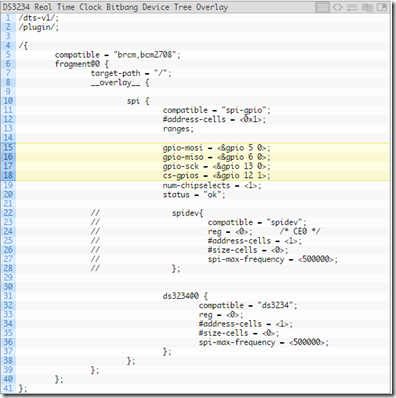
The first thought that came to my mind when I read that was: “wow, that’s a remarkably complicated-sounding name for a simple blog post”. I’m looking for replacements, so please drop a few in the comments. Anyway, back to business. The point of this post is to outline the procedures involved in using nRF24 radios (by now, you’ve realized I must really like them ) on a Raspberry Pi via a bitbanged SPI connection. Normally, you’d simply compile and install Tmrh20’s RF24 library, wire up the module the Pi’s dedicated SPI pins, and then go forth from there. However in my last post, there was the possibility that the hardware/dedicated SPI pins would be used for some other purpose ( oh I don’t know, providing wired ethernet maybe? ) and would be unavailable to do this. I then talked about the moderately-involved process of providing a software-based/bitbanged SPI peripheral which could then be used for some other purpose. This post aims to illustrate one such possibility. The RF24 librar...

Bitbanging SPI on the Raspberry Pi (via spi-gpio)

Image
Hello all and happy holidays to everyone! I’m taking a break off work for the holidays so I have a little bit of time on my hands. I will therefore regale you with tales of my exploits! From my last post, I talked about the somewhat “edge” case where you’d want to add (cheap) Ethernet to a Raspberry Pi, probably the A+ or Zero as the case may be. I haven’t figured out the fixed MAC thing just yet, but I’m working on it. Anyways, after some time, another edge-edge case came to me: The ENC28J60 takes up the only SPI peripheral available on the Pi, so what if you needed to use both the ENC28J60 AND some other SPI device? The Pi’s SPI peripheral has two chip selects, so it is theoretically possible to use the exact same bus while using the first chip select for the ENC28J60 (which it uses by default) and using the second chip select for the other device. However, it goes without saying that network communications require some serious computing firepower so it might cause a bit of a perfo...

Cheap Ethernet on the Raspberry Pi (A+/Zero/all probably)

Hey all, Been a while since my last post. I'm currently embarking on a one-year compulsory Youth Service program, which for academic purposes means I'm going to be serving my country (Nigeria) for one year by working in an organization. Its formally called the National Youth Service Corps (NYSC) and it begins with a three-week orientation course in the state one has been posted to. The orientation camp was really fun. Met some really amazing people..(I'm thinking of you as I write this, B...) *ahem* Shortly after the formal end of the orientation camp I returned home, and some time later I saw the announcement for the Raspberry Pi Zero (which for those who don't know is a single-board computer sporting an ARMv6/ARM11 SoC running at 1GHz with 512MB of RAM, no network options by default and one microUSB host port....for $5..yes, five US dollars). Naturally I was intrigued - I mean, its not exactly monster hardware, but the cost is certainly compelling. Sadly it was sol...

Ubilinux on the Intel Galileo: Tmrh20's RF24 Library for nRF24L01+ radios (Part III)

[Deprecated - Updated post is  here ] *sigh* The saga continues. So, I did some googling around, and found a blog where a guy recommended installing a tool called valgrind. Apparently valgrind is a memory leak detector amongst many other things. Was a bit skeptical but I went right ahead, apt-get install'd valgrind and then invoked my new program under valgrind as follows; valgrind ./program After about a minute or two, valgrind shows me an error at some memory location, explaining that it encountered an illegal/invalid instruction at that location and gave me two reasons why that could happen. Following the...stack trace....it printed, the problem seemed to be coming from code in the librf24-bcm.so file. Strange. After some more Google-fu, which eventually led me to Wikipedia, I found that the Quark X1000 SoC used on the Galileo did not support SSE or MMX instructions, and was instruction-set architecture compatible with the i586 family. I thought about it, and it seemed ...

Ubilinux on the Intel Galileo: Tmrh20's RF24 Library for nRF24L01+ radios (Part II)

[Deprecated - Updated post is  here ] Hey all, So, today I continue my little anecdote about getting the RF24 library up and running on the Ubilinux distro running on the Intel Galileo. From the last post, I ran: make -B RF24_MRAA=1 but got an error about WProgram.h not being found. After some knocking about, I figured that editing the RF24_config.h file and adding these defines: #define MRAA #define RF24_LINUX To the section titled "/***** User Defines*****/" Would make it possible to compile it. Thus, after editing the file, I ran make -B RF24_MRAA=1 again, and the compilation began in earnest. Please note that at this point, I had downloaded, compiled and installed the MRAA library as described in  this post . Sadly, I didn't set the CC and CXX variables in the make invocation, so make defaulted to using gcc and g++, and I got the "illegal compiler instruction" error once again. Re-running make as: make CC=clang CXX=clang++ -B RF24_MRAA=1 still en...

Ubilinux on the Intel Galileo: Tmrh20's RF24 Library for nRF24L01+ radios (Part I)

[Deprecated - Updated Post is  here ] Hey all, A few months ago, I had the opportunity to play with a couple of nRF24L01+ 2.4GHz radios from Nordic Semiconductor. Xbee radios from Digi are cool but rather pricey, and in all fairness I've only ever used them in simple point-to-point networks. The cheap 433MHz radios pick up waaaaay too much noise to be useful in high-throughput scenarios IMHO, so I was surprised to see how well the nRF24s performed. They're also really cheap (check 'em out on Aliexpress), interface to the host controller over SPI, and have some impressive features like configurable radio channels, communication rates, transmit power and a flexible addressing scheme, in that each radio has a number of "Pipes" which are like slots for sending or receiving data. Basically, the Pipes are numbered 0-5, and Pipe 0 is used for transmission (when transmitting) by default, while all other pipes are strictly reception pipes. Pipe 0 and Pipe 1 can unique h...