Posts

Showing posts with the label raspberry pi

Testing out the IoT pHAT

Image
Hail, people! Continuing on from last time, I had a little time to muck about with the IoT pHAT to try to get a general idea of how well it worked. What I did was to test out WiFi only, BT only, then WiFi + BT. I’ve described them as Tests 1, 2 and 3 respectively below. These tests were carried out on a Raspberry Pi Model B+ running the 2016-11-25 version of the Raspbian Jessie Lite distribution. Test 1 For the WiFi only test, I placed the pHAT on a B+ and edited the /etc/wpa_supplicant/wpa_supplicant.conf file to (auto)connect to my home WiFi network. Did a reboot, and voila, the ‘raspberrypi’ entry showed up in the router’s DHCP table. I was able to login via SSH and transfer a few files using WinSCP. Overally it performed flawlessly here – the connection was rock solid and performed satisfactorily. I didn’t run any iperf tests though – this is because I don’t intend to use the pHAT for any applications where throughput is an issue anyway. But I don’t expect it to be (signific...

Revisiting The RedBearLab IoT pHAT

Howdy, folks. Hope everyone has been okay and has had a good week. Its Friday again! So my first proper post of 2017 is about the IoT pHAT from RedBearLab, which (if you can recall) I was supposed to review. Due to issues with the HAT firmware that was not possible for quite some time. In the early hours of January 12th, a firmware update was made available which purportedly fixed the issues. On testing it myself, I found this to be the case. So let’s talk about how to get up and running with it. Typically, you’d want to start at this page , but there’s alot of information in there, some of which (thus far) doesn’t seem necessary anymore, so I’m going to try to keep it as linear as I can. First off, you’ll need an IoT pHAT – not surprisingly. I backed their crowdfunding campaign, but you can now buy one on the RedBearLab store if you don’t already have one. You can get one of two versions – one with headers presoldered and one without headers presoldered. I chose the former version....

Not a First Impressions Post

Hello! This post was supposed to be the promised "First Impressions" post for the IoT pHAT from RedBear we unboxed recently. Sadly, I will be holding that post off for a little while. Why, you ask? Basically, it comes down to the current setup process. Apparently there are certain issues with the Pi's firmware which are to be fixed in the next release. While the pHAT is currently usable, I know whatever process I'd describe will soon become redundant so I'm holding off for the next Raspbian release (should be out really soon) to do everything all at once. In the meantime, I recently got my hands on an Intel Edison Kit for Arduino, so I should post some stuff about that really soon. Perhaps even do a First Impressions post about that instead? ;-)

Unboxing the RedBearLab IoT pHat

Image
Hello! Been a while – I hope the winds of fortune have been blowing favorably in your various directions. Been rather busy with work myself, so I apologize for the long silence. As a reparation, today will be my first ever unboxing post! In my never-ending search for cheap yet functional stuff, A few months ago I began following a certain project on Hackaday.io , which combined two of my favorite things at the time – the ESP8266 WiSoc and the Raspberry Pi (Zero). Essentially, the project was exploring a means of using the ESP8266 as a WiFi peripheral for the Pi with full OS support – so theoretically you’d hook up the ESP8266 (specifically the ESP07/12 models as I recall), load up whatever kernel module was needed, and you’d get a wlan0 device which you could use to do awesome. At the end, it ended up working and the board designs and everything needed are up there on Hackaday.io. However that guy ended up with a ~$20 board, which is like 4x the cost of a Pi Zero. Shortly after that,...

Enabling SPI1 on the Raspberry Pi B+/Zero/2/3

Image
Me hearties, Let us plunder and pil.. Sorry, wrong blog. Ahem. Hey all, Its been a while. Been busy at work as usual, and haven’t really had much time to write much. As penance, I will post not one but two updates! This particular post is in relation to Raspberry Pi users specifically. I had earlier talked about the vagaries involved in emulating SPI over GPIO in order to get an additional SPI peripheral. It was a moderately involved process, but the rewards were great With the most recent release of the Raspbian Jessie distribution (2016-05-10), a number of improvements have been made to both the desktop parts and the “under-the-hood” parts, perhaps most significantly the kernel. This new release uses Kernel version 4.4, which now adds the ability to use the second hardware SPI peripheral, SPI1, on the Raspberry Pi. This is only available to devices with the 40-pin header (as seen from the title of this post) so users of the original model A and B will probably need to turn to...

nRF24L01+ Radio Communications using RF24 over SPI-GPIO

Image
The first thought that came to my mind when I read that was: “wow, that’s a remarkably complicated-sounding name for a simple blog post”. I’m looking for replacements, so please drop a few in the comments. Anyway, back to business. The point of this post is to outline the procedures involved in using nRF24 radios (by now, you’ve realized I must really like them ) on a Raspberry Pi via a bitbanged SPI connection. Normally, you’d simply compile and install Tmrh20’s RF24 library, wire up the module the Pi’s dedicated SPI pins, and then go forth from there. However in my last post, there was the possibility that the hardware/dedicated SPI pins would be used for some other purpose ( oh I don’t know, providing wired ethernet maybe? ) and would be unavailable to do this. I then talked about the moderately-involved process of providing a software-based/bitbanged SPI peripheral which could then be used for some other purpose. This post aims to illustrate one such possibility. The RF24 librar...

Bitbanging SPI on the Raspberry Pi (via spi-gpio)

Image
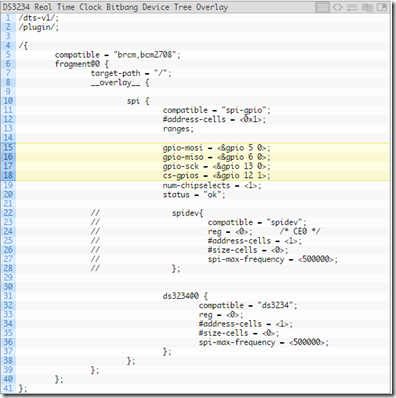
Hello all and happy holidays to everyone! I’m taking a break off work for the holidays so I have a little bit of time on my hands. I will therefore regale you with tales of my exploits! From my last post, I talked about the somewhat “edge” case where you’d want to add (cheap) Ethernet to a Raspberry Pi, probably the A+ or Zero as the case may be. I haven’t figured out the fixed MAC thing just yet, but I’m working on it. Anyways, after some time, another edge-edge case came to me: The ENC28J60 takes up the only SPI peripheral available on the Pi, so what if you needed to use both the ENC28J60 AND some other SPI device? The Pi’s SPI peripheral has two chip selects, so it is theoretically possible to use the exact same bus while using the first chip select for the ENC28J60 (which it uses by default) and using the second chip select for the other device. However, it goes without saying that network communications require some serious computing firepower so it might cause a bit of a perfo...

Cheap Ethernet on the Raspberry Pi (A+/Zero/all probably)

Hey all, Been a while since my last post. I'm currently embarking on a one-year compulsory Youth Service program, which for academic purposes means I'm going to be serving my country (Nigeria) for one year by working in an organization. Its formally called the National Youth Service Corps (NYSC) and it begins with a three-week orientation course in the state one has been posted to. The orientation camp was really fun. Met some really amazing people..(I'm thinking of you as I write this, B...) *ahem* Shortly after the formal end of the orientation camp I returned home, and some time later I saw the announcement for the Raspberry Pi Zero (which for those who don't know is a single-board computer sporting an ARMv6/ARM11 SoC running at 1GHz with 512MB of RAM, no network options by default and one microUSB host port....for $5..yes, five US dollars). Naturally I was intrigued - I mean, its not exactly monster hardware, but the cost is certainly compelling. Sadly it was sol...